Agentic payments with Skyfire
Agentic payments enable AI agents to autonomously run Apify Actors using third-party payment providers, without requiring traditional Apify user accounts. This allows agents to discover, execute, and pay for web scraping and automation tasks independently.
Apify supports agentic payments through Skyfire, a payment network specifically designed for AI agents.
Agentic payments are an experimental feature and may change significantly as payment protocols and AI technologies evolve.
This integration uses a third-party service. If you find outdated content, please submit an issue on GitHub.
What is Skyfire?
Skyfire is a payment network built specifically for AI agents, enabling autonomous transactions with digital wallets and spending controls. It provides the infrastructure necessary for agents to make payments on behalf of users, allowing autonomous AI-driven workflows.
With Skyfire integration, agents can discover available Apify Actors, execute scraping and automation tasks, and pay for services using pre-funded Skyfire tokens, all without human intervention.
Use Skyfire with Apify MCP server
The Apify MCP server provides the simplest way for agents to access Apify's Actor library using Skyfire payments.
Prerequisites
Before using agentic payments through MCP, you need:
- A Skyfire account with a funded wallet - sign up at Skyfire
- An MCP client that supports multiple server connections, such as OpenCode, Claude Desktop with MCP support, or other compatible clients
- Both MCP servers configured: Skyfire's MCP server and Apify's MCP server
Configuration
Configure your MCP client to connect to both the Skyfire and Apify MCP servers. When connecting to the Apify MCP server for agentic payments, you must include the ?payment=skyfire query parameter in the server URL. This enables the agentic payment flow and informs the agent about payment requirements.
https://mcp.apify.com?payment=skyfire
- OpenCode
- Claude Desktop
If you're using OpenCode, add this configuration to your opencode.json file (refer to OpenCode configuration docs for file location on your system):
{
  "$schema": "https://opencode.ai/config.json",
  "mcp": {
    "skyfire": {
      "enabled": true,
      "type": "remote",
      "url": "https://mcp.skyfire.xyz/mcp",
      "headers": {
        "skyfire-api-key": "YOUR_SKYFIRE_API_KEY"
      }
    },
    "apify": {
      "enabled": true,
      "type": "remote",
      "url": "https://mcp.apify.com?payment=skyfire"
    }
  }
}
If you're using Claude Desktop, add this configuration to your claude_desktop_config.json file (refer to Claude Desktop configuration docs for file location on your system) and restart the application:
{
  "mcpServers": {
    "skyfire": {
      "command": "npx",
      "args": [
        "mcp-remote",
        "https://mcp.skyfire.xyz/mcp",
        "--header",
        "skyfire-api-key: YOUR_SKYFIRE_API_KEY"
      ]
    },
    "apify": {
      "command": "npx",
      "args": [
        "mcp-remote",
        "https://mcp.apify.com?payment=skyfire"
      ]
    }
  },
  "isUsingBuiltInNodeForMcp": true
}
Replace YOUR_SKYFIRE_API_KEY with Skyfire buyer API key, which you can obtain from your Skyfire dashboard.
How it works
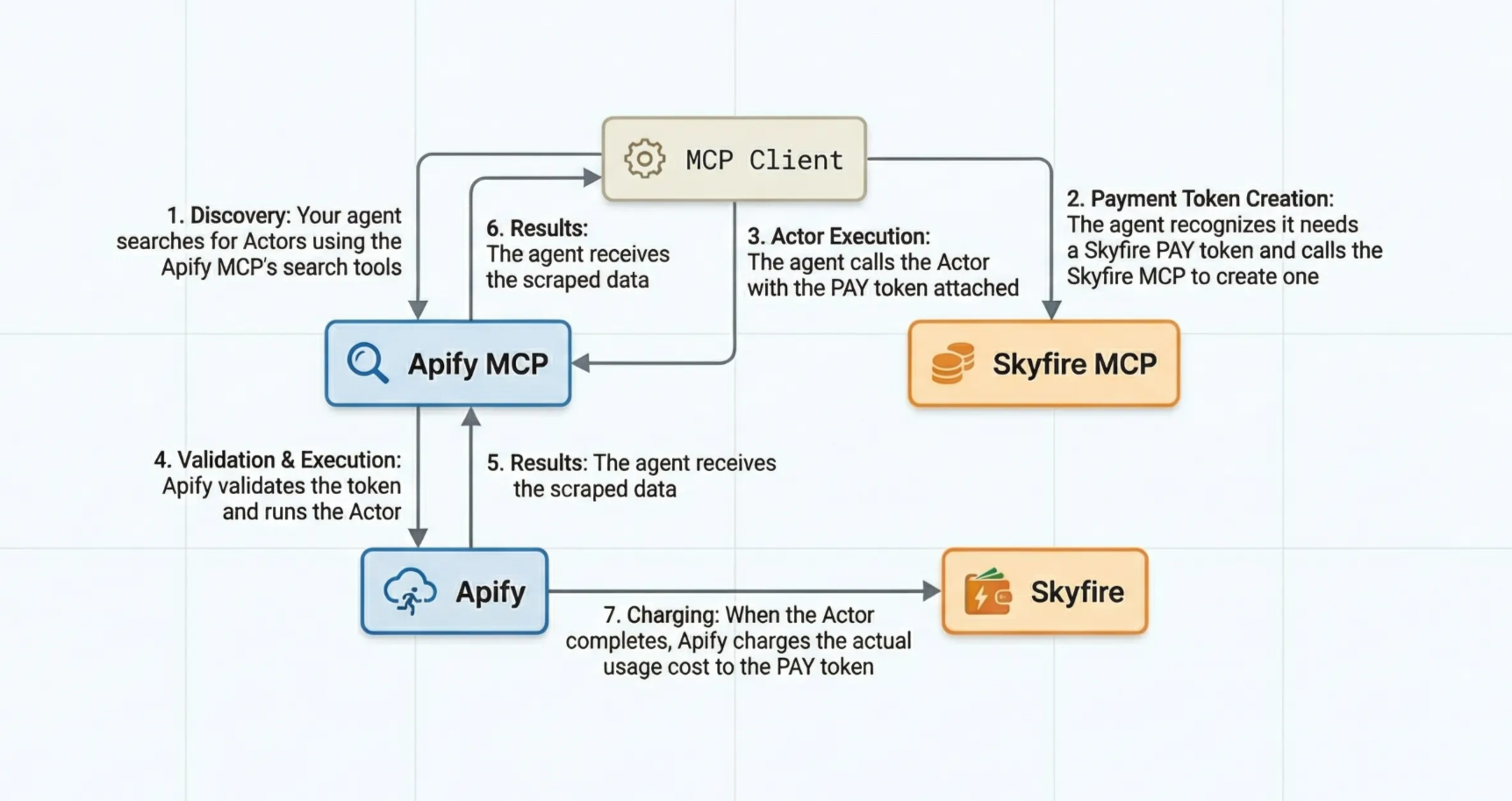
When an agent uses the Apify MCP server with Skyfire payments, the workflow proceeds as follows:
- The agent searches for suitable Actors using the search tools or works with pre-loaded Actors.
- When attempting to run an Actor, the agent recognizes the need for a Skyfire PAY token with a minimum of $5 and calls the Skyfire MCP server to create it.
- The agent calls the Actor tool with the payment token.
- The Apify platform validates the token and starts the Actor run.
- The Actor does the work and delivers results.
- When the run completes, the agent receives the Actor results and can retrieve additional data if needed.
- Finally, Apify's billing system charges the Skyfire PAY token for the actual usage cost.
Any unused funds remain available in the token for future runs or are returned to your Skyfire wallet when the token expires. This means you will not lose money if the actual usage is less than the $5 minimum.
Pre-loading Actors
For more predictable workflows, you can pre-load specific Actors when connecting to the MCP server by adding them to the URL:
https://mcp.apify.com?payment=skyfire&tools=actor1,actor2,actor3
Replace actor1,actor2,actor3 with the actual Actor IDs you want to make available, such as junglee/free-amazon-product-scraper,streamers/youtube-scraper.
See which Actors support agentic payments.
Actor discovery
When not pre-loading Actors, agents can discover suitable Actors dynamically using the search tools. The search automatically filters results to show only Actors that support agentic payments.
Use Skyfire with Apify API
For direct API integration, you can use Skyfire PAY tokens to authenticate and pay for Actor runs.
The MCP client handles these operations automatically when using Skyfire PAY tokens.
Authentication
Instead of using a traditional Apify API token, pass your Skyfire PAY token in the request header:
skyfire-pay-id: YOUR_SKYFIRE_PAY_TOKEN
Discover payment requirements
To learn the Skyfire-specific payment details before paying, call the endpoint without a token and add the X-APIFY-PAYMENT-PROTOCOL: SKYFIRE header. The API responds with HTTP 402 and the Skyfire payment requirements, which you use to create a PAY token.
curl -si \
  -H 'X-APIFY-PAYMENT-PROTOCOL: SKYFIRE' \
  'https://api.apify.com/v2/actors/ACTOR_ID/run-sync-get-dataset-items'
# → HTTP 402 with the Skyfire payment requirements
Once you send the skyfire-pay-id header, the protocol is inferred from it, so you no longer need to include X-APIFY-PAYMENT-PROTOCOL.
Run an Actor
Make a standard Actor run request to the run Actor endpoint, but include the Skyfire PAY token in the header.
curl -X POST \
  'https://api.apify.com/v2/actors/ACTOR_ID/run-sync-get-dataset-items' \
  -H 'skyfire-pay-id: YOUR_SKYFIRE_PAY_TOKEN' \
  -H 'Content-Type: application/json' \
  -d '{
    "input": {
      "your": "input"
    }
  }'
You can also use the asynchronous run Actor endpoint if you don't need to wait for results immediately.
Access the run and its storages
To access a run and its storages, reuse the same skyfire-pay-id header as authentication. As long as you send the token that paid for the run, you can call the run, dataset, and key-value store endpoints for that run and its default storages.
This is useful when you start a run asynchronously with the Run Actor endpoint and then poll its status or fetch results separately.
# Get run status - authenticate with the same Skyfire PAY token
curl -s \
  -H 'skyfire-pay-id: YOUR_SKYFIRE_PAY_TOKEN' \
  'https://api.apify.com/v2/actor-runs/RUN_ID'

# Fetch dataset items for the run
curl -s \
  -H 'skyfire-pay-id: YOUR_SKYFIRE_PAY_TOKEN' \
  'https://api.apify.com/v2/datasets/DATASET_ID/items'
Supported Actors
Not all Actors in Apify Store are eligible.
To be eligible for per-request agentic payments, an Actor must:
- Use the pay-per-event pricing model. Pay-per-usage Actors are not supported.
- Charge only for events, not for platform usage. Actors with the Pay per event + usage option switched on are excluded.
- Run with limited permissions. Actors that request full permissions are excluded.
- Not use Standby mode.
The Actor's developer must also have completed identity verification (KYC). Until they do, none of their Actors are eligible.
Apify maintains a curated list of Actors approved for agentic payments. To check if an Actor supports agentic payments, use the allowsAgenticUsers=true query parameter when searching the store via API.
https://api.apify.com/v2/store?allowsAgenticUsers=true
Payment requirements
Your Skyfire PAY token must have at least $5 available to run Actors. However, you will only be charged for actual usage. If an Actor run costs less than 5$, the unused funds remain available in your token for future runs or return to your Skyfire wallet when the token expires.
Unsupported features
The following operations are not supported with agentic payments:
- Schedule creation or management
- Standby run initiation
- Integration setup such as webhooks to external services
- Actor resurrection after the payment token has been settled
Resources
- Model Context Protocol documentation - Complete guide to using the Apify MCP server
- Skyfire documentation - Official Skyfire guides and API reference
- Apify API reference - Complete API documentation for direct integration
- Actor permissions - Understanding Actor permission levels