Actor reviews
By reviewing and rating an Actor, you help other users understand how it performs. You can also let a developer know how they can improve their Actor.
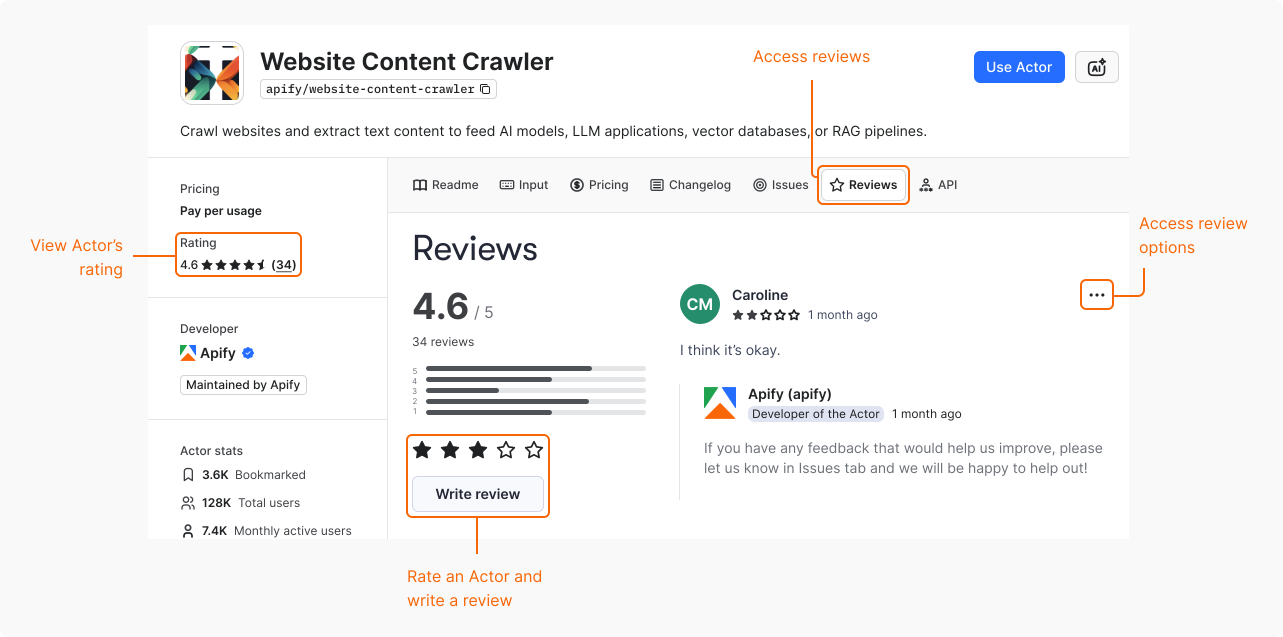
Check Actor's reviews
To see how other users rate and review a specific Actor:
- Navigate to the Actor's page in Apify Store.
- Select the Reviews tab.
Add a review
To share your opinion of an Actor:
- Navigate to the Actor's page in Apify Store.
- Select the Reviews tab.
- Under the Actor's rating, you have two options:
- To only rate the Actor, use the star rating.
- To rate and review the Actor, select Write review.
If you have a problem with the Actor that you're reviewing, consider opening an issue.
Edit a review
If you only rated the Actor, you can later change that rating and add a review.
If you rated the Actor and wrote a review, you can't edit either of those.
Delete a review
If you decide your review is no longer relevant, you can delete it:
- Navigate to the Actor's page in Apify Store.
- Select the Reviews tab.
- On your review, select Options > Delete.
Report a review
You can report reviews that don't follow the community standards. The support team verifies all reports and deletes reviews that violate Apify policies.
To report a review:
- On a review, select Options > Report.
- In Reason for reporting, select the right category from a dropdown list.
- (Optional) In Additional details, add a comment to the report.
- Select Submit.
Reasons for reporting a review
When reporting a review, select one of the following reasons:
- Hate speech or offensive language. For example, review offends the Actor developer, Apify community, or uses foul language.
- False or misleading information. For example, review contains false information about the Actor's pricing.
- Spam or irrelevant content. For example, review is an ad for another Actor or product.
- Harassment or abusive behavior. For example, review contains abusive or threatening language.
- Other. For example, review is not related to the Actor or the Apify platform.