Set up Actor monetization
Set up monetization to earn revenue every time users run your Actors on the Apify platform.
Monetize your Actor
To set up monetization for your Actor, first complete your billing and payment details. Then, you can define the pricing for your Actor:
- Log in to Apify Console.
- In the left-side panel, go to Development > My Actors.
- From the table, select the Actor you want to monetize.
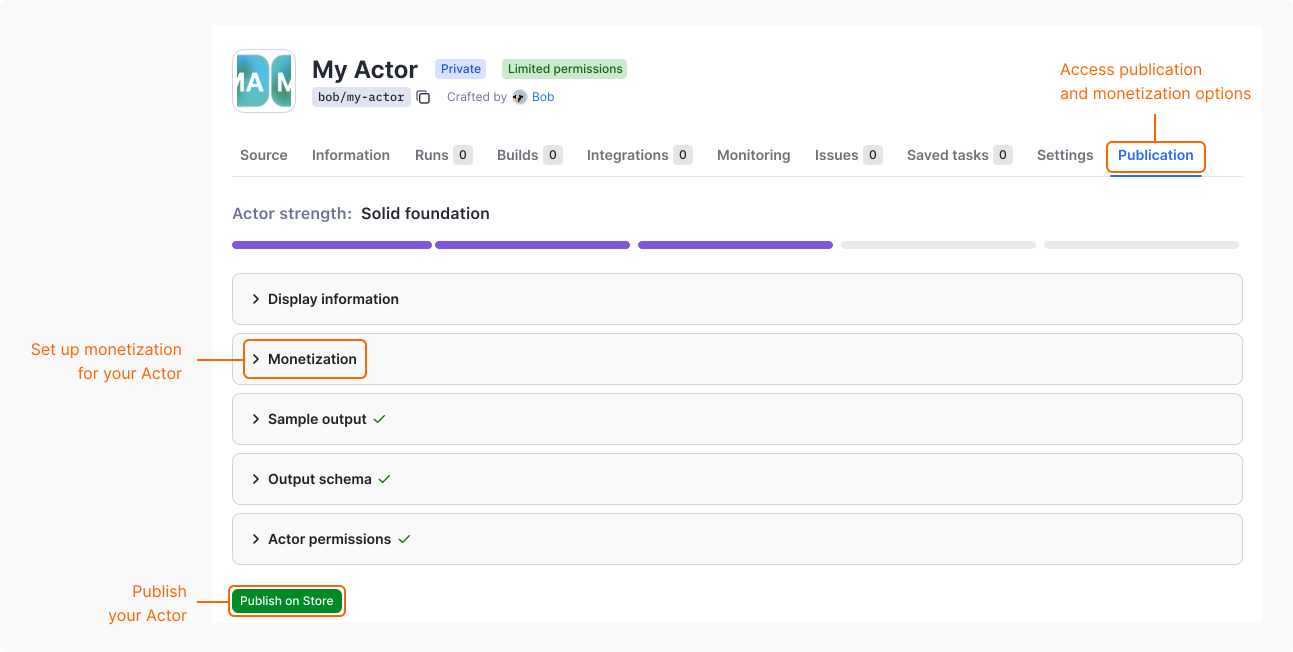
- Go to the Publishing tab.
- In Monetization section, select Set up monetization.
The monetization setup consists of three steps:
- In the Actor pricing step, you can:
- Modify or delete the
apify-actor-startevent. - Modify or delete the
apify-default-dataset-itemevent. - Define custom events and their prices.
- Transfer the platform usage costs on to users.
- Set the minimal cost that users can choose as max cost per run.
- Modify or delete the
- In the Primary event step, select the event that best represents the main value of your Actor. By default, the dataset event or the only existing event is used.
- In the Review step, verify the final pricing for your Actor before confirming.
Change monetization
To update the monetization of your Actor, follow the same steps as in the Monetize your Actor section.
Be careful about increasing prices. If you make your Actor too expensive, users might find an alternative solution in Apify Store. Avoid setting high prices exclusively for users on a free plan. Such users often become paying users once they see the value of your Actor, but they need to test it on enough data first.
If your Actor generates negative profit, follow the recommendations before increasing the price.
Significant changes
The following changes are considered significant:
- Changing the pricing model.
- Increasing prices.
- Adding a new paid event.
When you submit a significant change, users of your Actor are notified and the change is scheduled to take effect after 14 days. During this notice period, the current pricing remains active.
Once you submit a significant change, you can't cancel or modify it. To revert a planned change, contact support.
You can submit significant changes once per month per Actor, so plan your pricing strategy carefully. A pending change blocks submitting new ones. Wait for the significant change to take effect before submitting another one.
Note that if your Actor has no paying users, the waiting period doesn't apply and the change takes effect immediately.
For details, see Apify Store publishing terms and conditions.
Non-significant changes
The following changes take effect immediately and don't have any restrictions:
- Decreasing prices.
- Increasing prices if the Actor has no paying users.
- Removing events.
- Updating event descriptions.
- Adjusting settings that aren't related to pricing.