Actor web server schema
The webServerSchema field in .actor/actor.json attaches an OpenAPI 3.x specification to your Actor. You can define the schema for any Actor that exposes an HTTP server. When you enable standby mode, Apify Console and Apify Store render an interactive Server tab on the Actor's detail page. From there you can browse endpoints, inspect request and response schemas, and send requests directly from the browser.
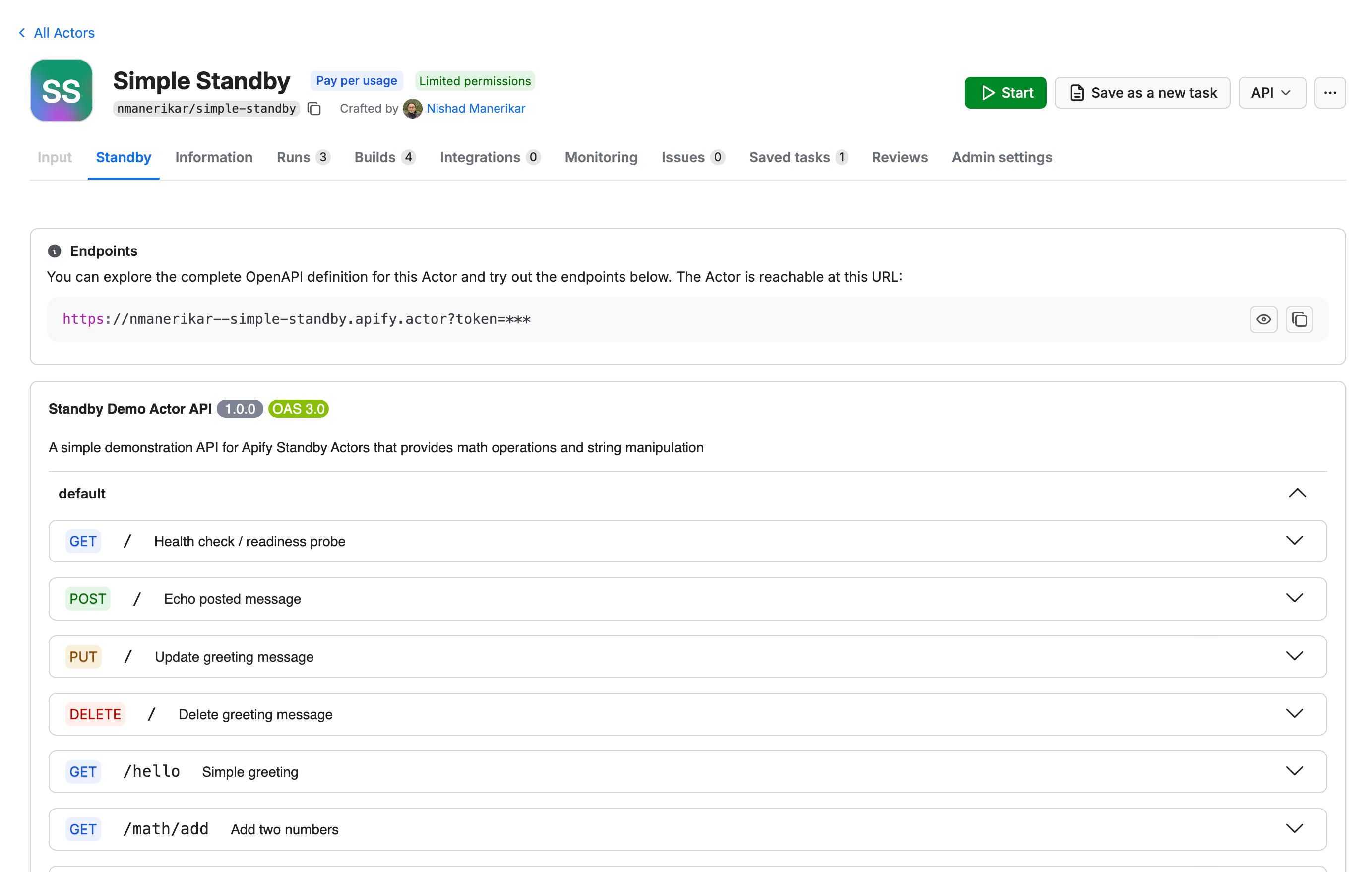
Define the web server schema
You can define the OpenAPI spec inline in .actor/actor.json or reference a separate file.
Reference an external file
{
    "actorSpecification": 1,
    "name": "my-api-actor",
    "version": "1.0",
    "usesStandbyMode": true,
    "webServerSchema": "./openapi.json"
}
Place your OpenAPI spec in .actor/openapi.json:
{
    "openapi": "3.0.0",
    "info": {
        "title": "My API Actor",
        "version": "1.0.0"
    },
    "paths": {
        "/search": {
            "get": {
                "summary": "Search for items",
                "parameters": [
                    {
                        "name": "query",
                        "in": "query",
                        "required": true,
                        "schema": { "type": "string" }
                    }
                ],
                "responses": {
                    "200": {
                        "description": "Search results"
                    }
                }
            }
        }
    }
}
Embed inline
{
    "actorSpecification": 1,
    "name": "my-api-actor",
    "version": "1.0",
    "usesStandbyMode": true,
    "webServerSchema": {
        "openapi": "3.0.0",
        "info": {
            "title": "My API Actor",
            "version": "1.0.0"
        },
        "paths": {
            "/health": {
                "get": {
                    "summary": "Health check",
                    "responses": {
                        "200": { "description": "OK" }
                    }
                }
            }
        }
    }
}
Follow the standard OpenAPI 3.x format to describe your endpoints, parameters, request bodies, and responses.
Build and deploy
The build process validates webServerSchema, similar to other Actor schemas like input schema and dataset schema. If the spec is malformed, the build fails with a validation error.
The platform doesn't enforce the schema at runtime. Unlike input schema, the web server schema only documents your Actor's interface. The platform forwards incoming requests to your server without validating them or your server's responses against the schema. Your server must validate requests itself.
Once deployed, the Server tab appears automatically on the Actor's detail page when you enable standby mode. It renders your spec with Swagger UI and handles authentication automatically - Actor users can send requests without configuring API tokens.
Your servers array is replaced with the Actor's standby URL at display time. Custom server URLs are ignored.
Related fields
| Field | Description |
|---|---|
usesStandbyMode | Must be true for the Server tab to appear. See standby mode. |
webServerSchema | The OpenAPI spec that powers the Server tab. Defined in .actor/actor.json as an inline object or a path to a JSON file. |
webServerMcpPath | The HTTP path where the Actor exposes its MCP server. The Actor's MCP endpoint is the Standby URL followed by this path. See .actor/actor.json. |