Boolean and numeric input types
Boolean fields render as checkboxes and can be grouped under a caption. Numeric fields come in two types, integer and number, and can carry a range and a unit.
Boolean type
Example options with group caption:
{
    "verboseLog": {
        "title": "Verbose log",
        "type": "boolean",
        "description": "Debug messages will be included in the log.",
        "default": true,
        "groupCaption": "Options",
        "groupDescription": "Various options for this Actor"
    },
    "lightspeed": {
        "title": "Lightspeed",
        "type": "boolean",
        "description": "If checked then actors runs at the
            speed of light.",
        "prefill": true
    }
}
Rendered input:
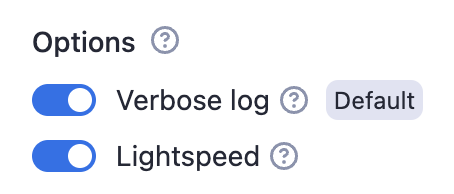
Properties:
| Property | Value | Required | Description |
|---|---|---|---|
editor | One of
| No | Visual editor used for the input field. |
groupCaption | String | No | If you want to group multiple checkboxes together, add this option to the first of the group. |
groupDescription | String | No | Description displayed as help text displayed of group title. |
nullable | Boolean | No | Specifies whether null is an allowed value. |
Numeric types
There are two numeric types supported in the input schema: integer and number.
- The
integertype represents whole numbers. - The
numbertype can represent both integers and floating-point numbers.
Example:
{
    "title": "Memory",
    "type": "integer",
    "description": "Select memory in megabytes",
    "default": 64,
    "maximum": 1024,
    "unit": "MB"
}
Rendered input:

Properties:
| Property | Value | Required | Description |
|---|---|---|---|
type | One of
| Yes | Defines the type of the field - either an integer or a floating-point number. |
editor | One of:
| No | Visual editor used for input field. |
maximum | Integer or Number (based on the type) | No | Maximum allowed value. |
minimum | Integer or Number (based on the type) | No | Minimum allowed value. |
unit | String | No | Unit displayed next to the field in UI, for example second, MB, etc. |
nullable | Boolean | No | Specifies whether null is an allowed value. |